Week 3—Tuesday Onwards
Nothing but Infrastructure
Keen to make forward progress in spite of other (mostly administrative) distractions, I found myself spending the rest of the week 3 bouncing between infrastructural tasks that I hope will help lay the foundations for future work: trying Portainer, self-hosting Forgejo, and installing FreshRSS. I also took a little time out to continue with some real world maintenance.
Trying Portainer
While I’ve been running home infrastructure for a little while, I’m fairly new to the whole thing and I’ve yet to establish my own preferences and best practices. Using Docker to run services, for example, still makes me deeply uncomfortable: I’ve been using Docker Compose—docker-compose.yml files are easy to version using a combination git Git and Ansible—but I find updates and container life cycles hard to manage. With that in mind, I decided to take a shot at using Portainer.
Bootstrapping Portainer proved incredibly easy using Docker Compose:
services:
  portainer:
    container_name: portainer
    image: portainer/portainer-ce:lts
    restart: always
    volumes:
      - /var/run/docker.sock:/var/run/docker.sock
      - /storage/services/portainer/data:/data
    ports:
      - 9443:9443
      - 8000:8000

networks:
  default:
    name: portainer_network
(This deviates very slightly from the off-the-shelf configuration, mapping /data to /storage/services/portainer/data to ensure it’s stored on my ZFS pool and easy to back up.)
Once it was up and running (docker compose up -d), I found Portainer offers a comprehensive management interface, allowing you to create new container ‘stacks’ using Docker Compose files:

Given how easy it was to set up, I wish I’d tried Portainer earlier: I’m already finding its container and image management very convenient, and it feels like a great low-effort tool for trying out new services. I may, however, still turn to manually managed compose files for services that I choose to keep around.
Self-Hosting Forgejo
Over the past couple of weeks, I’ve noticed an uptick in hangs with my website builds using GitHub Actions. This has got in the way of writing, and I decided to see what I could do to improve things. Thinking the issue might be related to a longstanding issue in .NET process management and something that’s unlikely to get fixed any time soon (that the GitHub Actions runner might be failing to notice my build script terminating successfully), I decided to make the most of the opportunity to try out Forgejo to store and build my site.
With Portainer ready to go, installing Forgejo provided incredibly easy—I just used the Docker Compose file from their installation instructions (again mapping the data volume to my ZFS storage):
services:
  forgejo:
    image: codeberg.org/forgejo/forgejo:13
    container_name: forgejo
    restart: always
    environment:
      - USER_UID=1000
      - USER_GID=1000
    volumes:
      - /storage/services/forgejo/data:/data
      - /etc/timezone:/etc/timezone:ro
      - /etc/localtime:/etc/localtime:ro
    ports:
      - "3000:3000"
      - "222:22"
Everything just worked and, armed with a working Forgejo instance, I pushed my website—including 50GB of LFS files. Much to my surprise, this also worked (once I remembered to run git lfs fetch --all origin main to ensure I had a local copy of all LFS data)—I had been fully expecting Git LFS to require further setup, but it seems it’s provisioned out of the box with Forgejo.

Configuring automated builds using Forgejo Actions proved a little more nuanced however: the Forgejo runner doesn’t support macOS, so you have to use Gitea’s Act Runner instead. I also encountered real problems with Git LFS checkouts on the runner, necessitating a manual—and worryingly precarious—checkout step1:
- name: Checkout source
  shell: bash
  env:
    GITHUB_TOKEN: ${{ secrets.GITHUB_TOKEN }}
  run: |
    set -euo pipefail
    URL_BASE="${{ github.server_url }}"

    mkdir -p "$CHECKOUT_ROOT"
    if [ ! -d "$CHECKOUT_ROOT/.git" ]; then
      git clone --origin origin --no-checkout "https://${URL_BASE#https://}/${{ github.repository }}.git" "$CHECKOUT_ROOT"
    fi

    cd "$CHECKOUT_ROOT"
    git clean -fdx
    git config url."https://${GITHUB_TOKEN}@${URL_BASE#https://}/".insteadOf "https://${URL_BASE#https://}/"
    git config --unset-all http.${{ github.server_url }}/.extraheader || true  # Unhappy LFS workaround.
    git fetch --prune --tags origin
    git checkout "${{ github.ref_name }}"
    git reset --hard "origin/${{ github.ref_name }}"
From the discussion on Forgejo’s issue tracker, it seems the LFS issue might be related to my running Forgejo behind an nginx proxy. I’d like to investigate this but, for the time being, I have an approach that works.
With the checkout issues resolved, the rest of the build worked with no changes, lifted verbatim from my GitHub Actions workflow—it’s really quite impressive and fills me with hope for migrating other projects. I think I might still be seeing infrequent hangs in my builds though, so I wonder if there’s a race condition buried deep in InContext’s asynchronous code. Something to keep an eye on. 👀
Installing FreshRSS
Having written about the process of installing two services already this week, I’ll not go into much detail about FreshRSS. Suffice to say, I used Docker, Portainer, and nginx as a reverse proxy. It went smoothly.

It’s nice to finally have a self-hosted feed reader again after nearly 20 years (though I still long for Shaun Inman’s Fever feed reader), and I’ve been pleasantly surprised to discover it’s well supported by client apps like NetNewsWire. I’m hopeful the switch will unlock syncing with various retro computers in the future.
Signage
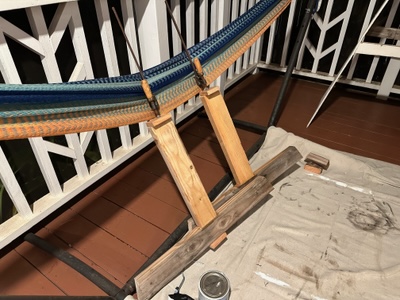
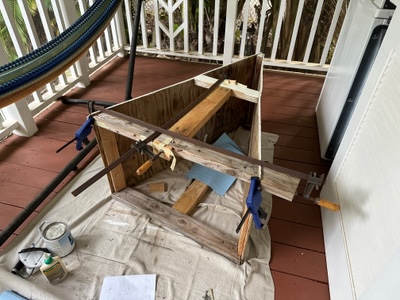
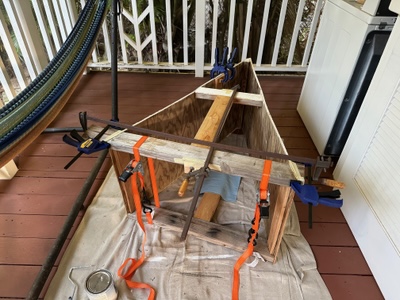
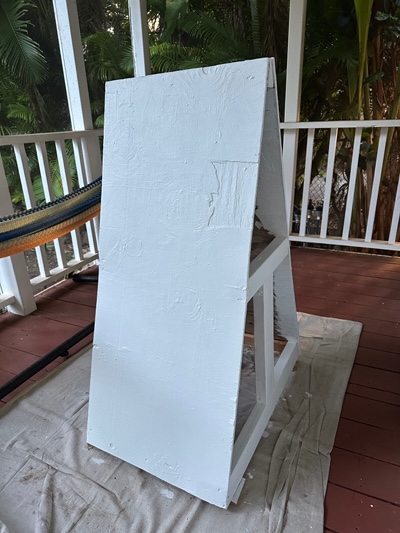
The week also brought an analogue pursuit in the form of some maintenance work on the sign for Mele Mele, our friend’s coffee shop. The Hawaiian climate is brutal and will destroy near-everything, so I took the opportunity of Sarah repainting the sign to reinforce it in the hope it’ll last another few years.
-
This step is even more complex than it might be as I want to cache checkouts between builds to avoid having to download all 50GB of my site on every build—the Act Runner differs from the GitHub Actions runner in that it doesn’t use stable checkout locations, necessitating some contortions. ↩