December Adventure Day 28
File Conversions
Inspired by Alex’s evergreen enthusiasm for the Psion Series 3 devices, and my recent Series 3a maintenance efforts, I’d love to find a way to incorporate these into my daily routines. Boasting a full keyboard, they are natural writing devices so, for day 28 of my December Adventure, I decided to focus on improving my workflows for journaling and writing-up projects on my Series 3mx.
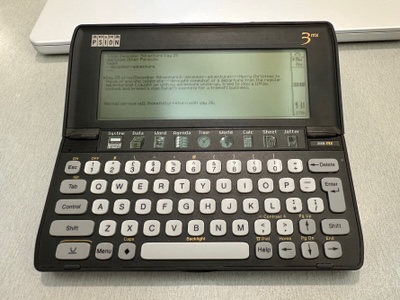
Out of the box, EPOC16 devices are well set up for writing—Psion Word is an entirely serviceable word processor. This leaves just the process of getting the files into modern formats, and into my other workflows. Reconnect, my modern Psion connectivity suite for macOS, supports file transfer for EPOC16 devices, but doesn’t support conversion for these older file formats, so I set about fixing this sort-fall, starting with Word file conversion.
Tony Smith has already produced an MIT licensed Word parser and converter written in Swift, Word2Text, (thanks Tony!), so this seemed like the natural starting point. Armed with a fully-functional implementation, there wasn’t too much to do but plumb it into Reconnect’s existing file conversion architecture:
private static let converters: [Conversion] = [

    // MBM
    Conversion { entry in
        return entry.fileType == .mbm || entry.pathExtension.lowercased() == "mbm"
    } filename: { entry in
        return entry.name
            .deletingPathExtension
            .appendingPathExtension("tiff")
    } perform: { sourceURL, destinationURL in
        let outputURL = destinationURL.appendingPathComponent(sourceURL.lastPathComponent.deletingPathExtension,
                                                              conformingTo: .tiff)
        try PsiLuaEnv().convertMultiBitmap(at: sourceURL, to: outputURL)
        try FileManager.default.removeItem(at: sourceURL)
        return outputURL
    },

    // WRD
    Conversion { entry in
        return entry.pathExtension.lowercased() == "wrd"
    } filename: { entry in
        return entry
            .name
            .deletingPathExtension
            .appendingPathExtension("txt")
    } perform: { sourceURL, destinationURL in
        let outputURL = destinationURL.appendingPathComponent(sourceURL.lastPathComponent.deletingPathExtension,
                                                              conformingTo: .plainText)
        let data = try Data(contentsOf: sourceURL)
        let bytes = [UInt8](data)[...]
        let result: ProcessResult = PsionWord.processFile(bytes)
        guard result.errorCode == .noError else {
            throw ReconnectError.unknown
        }
        try result.text.write(to: outputURL, atomically: true, encoding: .utf8)
        return outputURL
    }

]
Looking again at this code, there are some elements of the architecture that I’d love to revisit: I especially dislike the duplicated filename generation code. This exists because macOS needs to know the target filename upfront for drag-and-drop operations, but I could at least change my converter API to inject it back into the perform: block.
Architectural aspirations aside, everything just worked, and it’s now possible to effortlessly convert Psion Word files to text by drag-and-dropping them from Reconnect! 🥳
While I was at it, I also added a new ‘Conversions’ tab to the Reconnect settings:

I plan to expand on this in the future to allow per-file type options: Word2Text supports conversion to text or Markdown and I’d love to expose that functionality in Reconnect.